Why build it at all?
I'm a network engineer. I move packets, write firewall policy, and occasionally get paged at 2am because one of the software engineers blamed the network again (kidding). Web development is not my day job, and for years my "personal site" was a LinkedIn profile and a PDF resume I emailed to people.
But I wanted a place to host my CV and write up the things I tinker with - homelab builds, BGP/MPLS/VXLAN labs, the occasional issue that took me three hours to get right. One of the worst feelings is solving a problem and not documenting the solution the first time, only for the problem reoccur a few months later, leaving you scratching your head trying to recall whatever it was you did previously. And since I already run a homelab, I felt like the site itself could be the project. That reframing is what made it interesting. The site isn't just a place to write about the homelab. The site is a homelab project.
This is the first post in a series documenting how I built it, mistakes included.
Lastly, I should point out I built this with a lot of help from an AI assistant, used the way I'd use documentation or a TAC engineer that's never unavailable. It sped up the typing and explained the web concepts I didn't have coming in. The decisions were still mine, and so was the debugging when its first answer didn't work, which happened plenty. Honestly, working through the problems with a tireless explainer on hand is the most efficient way I've picked up a new domain in years. I'll point out where it helped and where I still had to think as the series goes.
The first fork in the road: static or dynamic
My research suggested that the conventional consensus for a personal site is to use a static site generator - Hugo, Jekyll, Astro, something that turns Markdown into plain HTML files you can host anywhere for free. It's fast, cheap, and low-maintenance. For most people it's the right answer, and if all you want is a CV and a blog, you could probably stop reading and go use Hugo.
I went the other way, for two reasons.
First, I wanted dynamic pieces eventually - a real admin interface to write posts from a browser, view counts, maybe search down the line. None of that fits cleanly into the static model without bolting on third-party services.
Second, and more honestly: I wanted to learn. Standing up a static site teaches you about a build pipeline. Standing up a dynamic site teaches you about an application, a reverse proxy, containers, DNS, and auth - which is a lot closer to the infrastructure I actually care about. The "harder" path was the point.
Self-hosted, on hardware I already own
I run Proxmox on a Minisforum MS-A2 - Ryzen 9 with plenty of cores and 96GB of RAM. It already hosts a pile of services behind Nginx Proxy Manager, with Cloudflare handling DNS and Authelia doing 2FA. Adding one more small VM to that setup costs me essentially nothing in resources and slots into infrastructure I already understand.
So the site lives on a dedicated Ubuntu 24.04 VM, running in Docker, proxied through the same NPM instance as everything else. No monthly hosting bill, full control, and every layer is something I can crack open and inspect.
Picking a backend: Python over Node
With "dynamic" decided, I needed a backend language. The two obvious candidates were Node.js and Python.
The deciding factor was boring and practical: I know more Python than JavaScript. Not a lot more - I'd call myself a Python novice who's comfortable scripting network automation but hadn't built a web app before. Still, when you're learning a new domain, you don't want to also be fighting unfamiliar language syntax at the same time. Picking the language I knew better meant I could spend my confusion budget on the web concepts instead.
Within Python, I went with FastAPI. A few reasons it fit:
- It's modern and async-capable, so there's room to grow if I ever need it.
- The patterns are consistent and the documentation is genuinely good.
- It pairs naturally with Jinja2 for server-side HTML templating, which turned out to be a pleasure to work with.
- If I ever expose any real endpoints, it generates API docs for free.
The alternative (Flask) would also have worked fine and is arguably even simpler. But FastAPI felt like the better thing to learn, and the async story meant I wasn't boxing myself in.
Server-side rendering, on purpose
One decision worth calling out: the site renders HTML on the server. When your browser asks for a page, FastAPI runs the Jinja2 template, builds the complete HTML, and sends you a finished document. There's no React, no client-side framework constructing the page after load.
For a CV and a blog, that's the right call. Pages load fast, search engines can read them without running JavaScript, and there's no build pipeline to babysit. When I want a little interactivity - a collapsible section here, a live preview there - I sprinkle in a bit of vanilla JavaScript on top. That's a much lighter tax than adopting a whole frontend framework for a site that's mostly text.
The stack, end to end
Here's where everything landed:
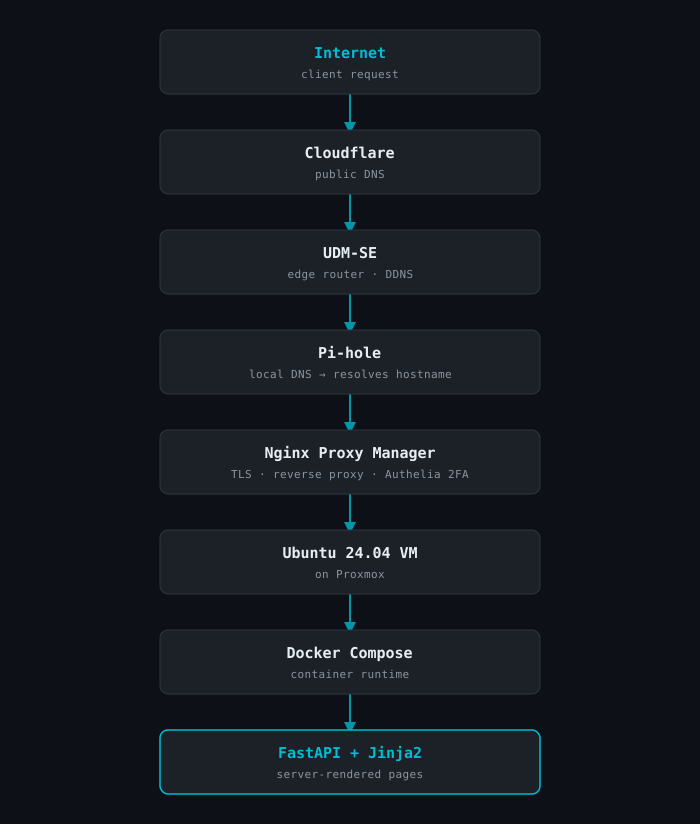
No database yet. Blog posts are just Markdown files on disk with a small metadata header - the filesystem is the database for now. If and when I need view counts or comments, SQLite is the natural next step, and the schema is easy to add later without re-architecting anything.
What's next
That's the high-level "why." In the next post I'll get into the infrastructure layer - building the VM on Proxmox, getting Docker running, and the various small things that fought me along the way (including a QEMU guest agent that refused to start until I gave the VM a cold boot, and a thin-provisioning detail that confused me for a bit).
If you've read this far and you just want a personal site with the least possible effort: use a static site generator. If you want a weekend project that doubles as a homelab exercise and teaches you a stack you can actually use elsewhere - this is a pretty good one.
Hail Southern.